Como usar Api de Notion con Next Js
Por Fernando Ticona
Use Notion como un CMS para crear un blog donde guardar mis notas de borrador e integrarlo a mi pagina web. Aquí te enseño cómo lo hice. Escuché hace tiempo que Notion abrió su API para que los desarrolladores creen integraciones con más herramientas, así que la plataforma se volvió todavía más versátil y útil. Eso me llamó la atención.
Aunque estoy ocupado con proyectos privados, me tomé la molestia de crear una integración. No sabía con qué empezar, así que hice lo más simple posible: un borrador.
Con el fin de mostrar en lo que estoy trabajando a un público general, creé una tabla en Notion con las propiedades necesarias para estructurar los borradores y alimentar mi blog.
¿Por qué uso Next.js?
En cuanto a Next.js, lo uso para mi pagina (fvcoder.com). Honestamente es más de lo que necesita una landing page, pero el sitio también contiene otros sistemas internos y proyectos privados, así que necesito esa robustez. Si no tienes algo así, te invito a usar React con Vite u otra herramienta más ligera.
¿Cómo empezar a usar Notion API?
Primero debes dirigirte a la web de Notion para Desarrolladores:
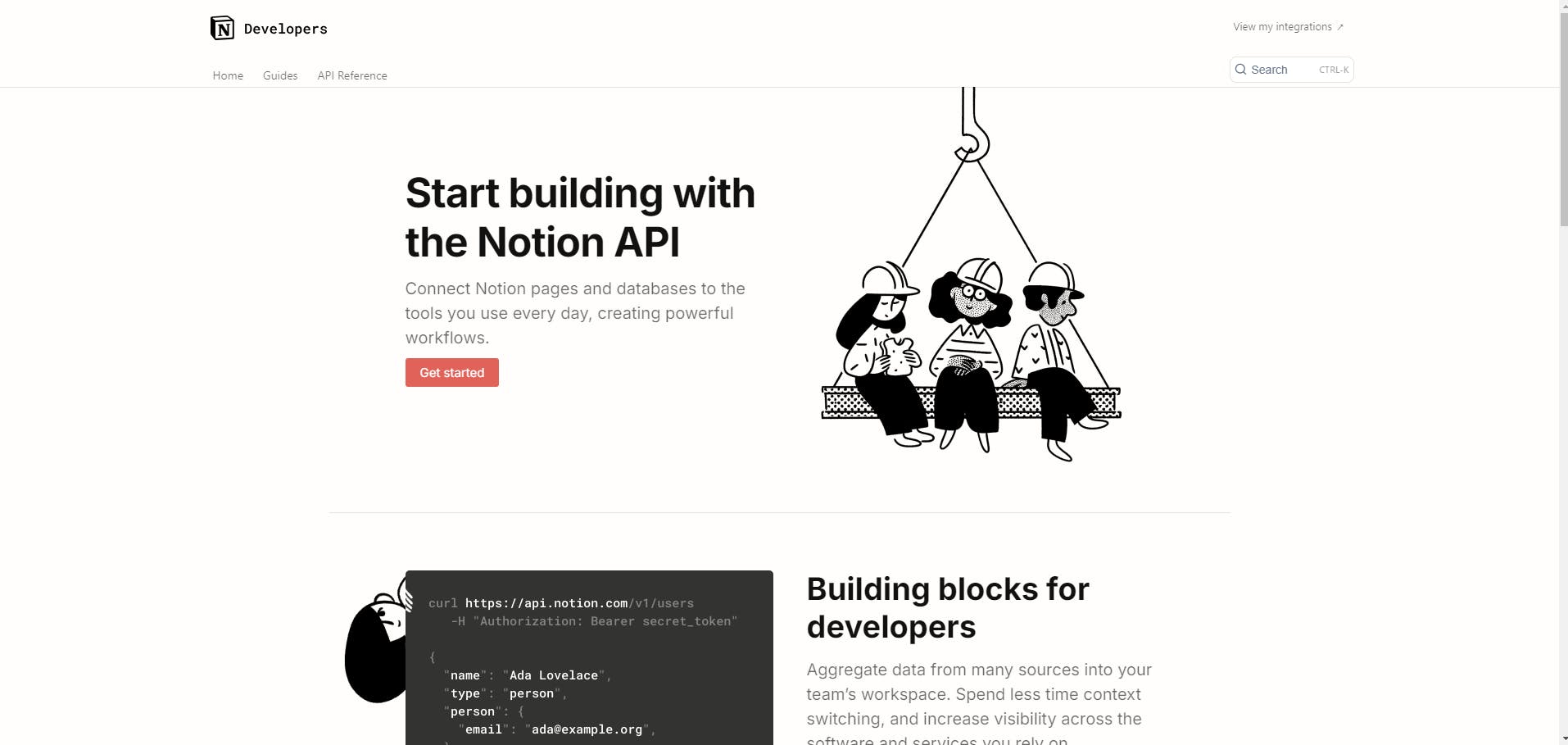
Aquí encontrarás la documentación oficial y las guías necesarias para comprender el uso de Notion API en tus proyectos.
Por ahora nos interesa generar las credenciales de acceso a la API.
¿Cómo obtengo el API key para Notion API?
Dirígete a Notion integraciones, haz clic en Nueva integración y rellena el formulario. Al finalizar te dará el API key para usar la API de Notion.
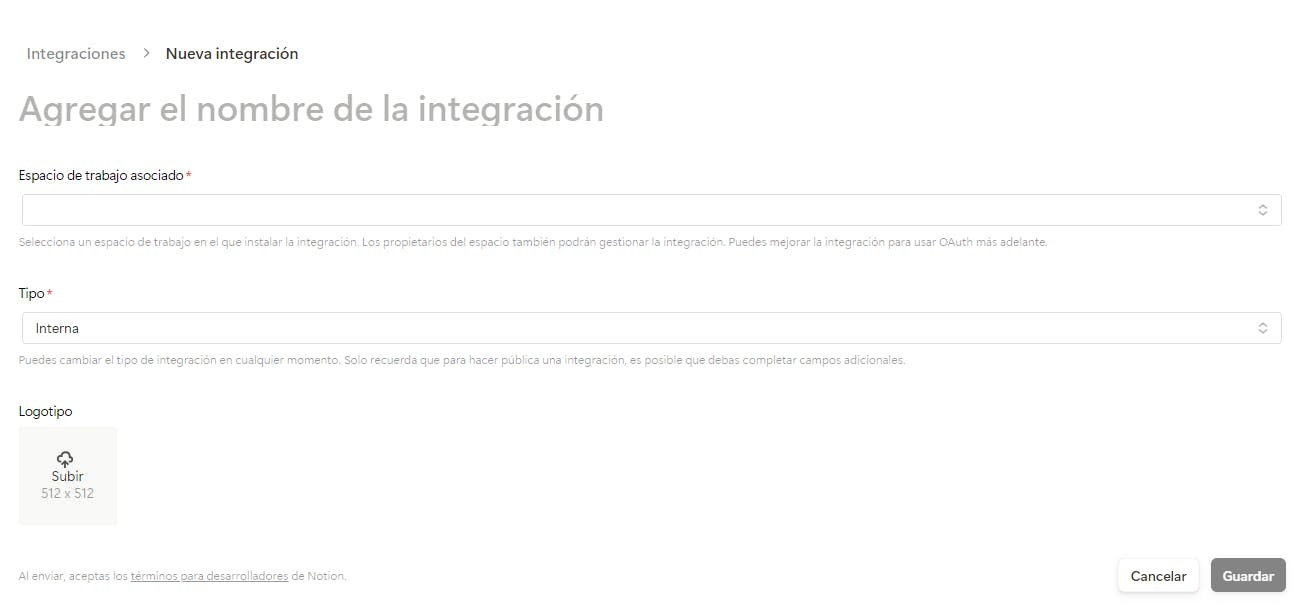
Notas importantes:
El tipo de integración público está orientado a autenticación, acceso a espacios de trabajo de diferentes usuarios y otros casos más amplios. Para este proyecto, nos interesa la integración interna.
Una vez creada la integración, ve a tu tabla o página y crea una conexión con tu integración:
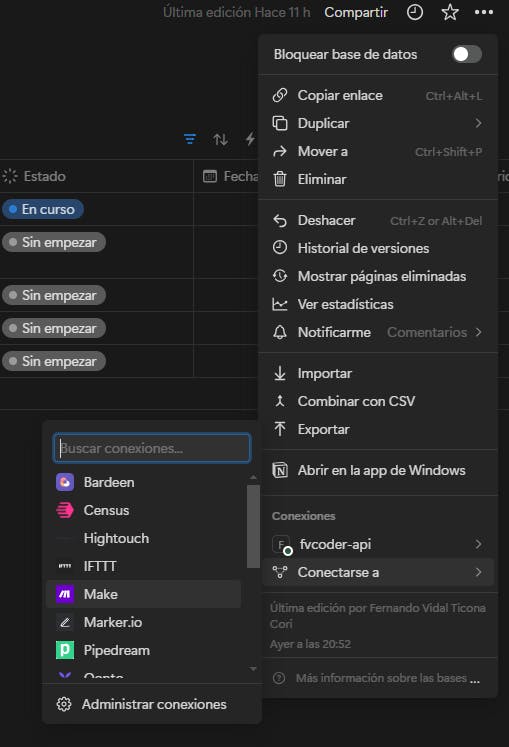
Este paso es manual. En mi caso ya está conectado, y es importante que lo realices porque, aunque tu espacio de trabajo esté relacionado, ninguna página estará habilitada para mostrarse ante la API.
¿Cómo interactúo con la API de Notion?
Ahora presta atención: necesitas 2 variables para interactuar con la API de Notion.
-
API key (ya la obtuviste en este punto)
-
Page ID
Para obtener el Page ID de la página, solo presta atención a la URL.
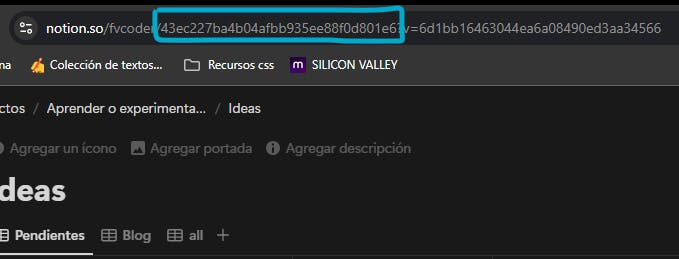
Ahora móntalo en variables de entorno:
NOTION_PAGE_ID=43ec227ba4b04afbb935ee88f0d801e6
NOTION_API_KEY=secret_ve&realizaLosPasosAnteriores
E instala la librería oficial de Notion para Node.js. Si tienes que hacerlo para otro framework o librería, igualmente funciona: la librería es agnóstica al framework.
npm i @notionhq/client
yarn add @notionhq/client
pnpm install @notionhq/client
Ahora inicia el cliente, y empieza a consultar:
  const notion = new Client({
    auth: process.env.NOTION_API_KEY,
  });

  const data = await notion.databases.query({
    database_id: process.env.NOTION_PAGE_ID as string,
    page_size: 12,
    sorts: [
      {
        property: 'Última edición',
        direction: 'descending',
      },
    ],
  });
Me dio como respuesta:
{
  "object": "list",
  "results": [
    {
      "object": "page",
      "id": "ac8f9b08-0133-47cb-a006-42c2e5c39d39",
      "created_time": "2024-07-23T23:50:00.000Z",
      "last_edited_time": "2024-08-02T13:03:00.000Z",
      "created_by": {
        "object": "user",
        "id": "59da831e-affe-486a-9200-39061ecc42e4"
      },
      "last_edited_by": {
        "object": "user",
        "id": "59da831e-affe-486a-9200-39061ecc42e4"
      },
      "cover": null,
      "icon": null,
      "parent": {
        "type": "database_id",
        "database_id": "43ec227b-a4b0-4afb-b935-ee88f0d801e6"
      },
      "archived": false,
      "in_trash": false,
      "properties": {
        "Fecha de creación": {
          "id": "%3BOW%3B",
          "type": "created_time",
          "created_time": "2024-07-23T23:50:00.000Z"
        },
        "Fuente": {
          "id": "DFNr",
          "type": "url",
          "url": "https://www.youtube.com/watch?v=ec5m6t77eYM"
        },
        "Etiquetas": {
          "id": "G~%3BA",
          "type": "multi_select",
          "multi_select": [
            {
              "id": "e13b4586-b9d2-465d-82b6-cb8e7d1c0d22",
              "name": "Api",
              "color": "purple"
            },
            {
              "id": "3f35c90a-bb87-43ae-82b3-fcbe09e45df4",
              "name": "Notion",
              "color": "default"
            }
          ]
        },
        "Estado": {
          "id": "IiyV",
          "type": "status",
          "status": {
            "id": "a3d3138e-89a4-4785-8d17-11cebac06efa",
            "name": "En curso",
            "color": "blue"
          }
        },
        "ítem principal": {
          "id": "IyLc",
          "type": "relation",
          "relation": [],
          "has_more": false
        },
        "Subítem": {
          "id": "J%7CYl",
          "type": "relation",
          "relation": [],
          "has_more": false
        },
        "Última edición": {
          "id": "c%3FjE",
          "type": "last_edited_time",
          "last_edited_time": "2024-08-02T13:03:00.000Z"
        },
        "📅 Calendario": {
          "id": "jCas",
          "type": "relation",
          "relation": [],
          "has_more": false
        },
        "Fecha de Publicacion": {
          "id": "pK%7C~",
          "type": "date",
          "date": null
        },
        "Blog": {
          "id": "%7CkEH",
          "type": "url",
          "url": null
        },
        "Nombre": {
          "id": "title",
          "type": "title",
          "title": [
            {
              "type": "text",
              "text": {
                "content": "Usar la api de Notion",
                "link": null
              },
              "annotations": {
                "bold": false,
                "italic": false,
                "strikethrough": false,
                "underline": false,
                "code": false,
                "color": "default"
              },
              "plain_text": "Usar la api de Notion",
              "href": null
            }
          ]
        }
      },
      "url": "https://www.notion.so/Usar-la-api-de-Notion-ac8f9b08013347cba00642c2e5c39d39",
      "public_url": null
    },
  ],
  "next_cursor": null,
  "has_more": false,
  "type": "page_or_database",
  "page_or_database": {},
  "request_id": "aae1d06e-b059-4feb-b008-b58f14ef52d7"
}
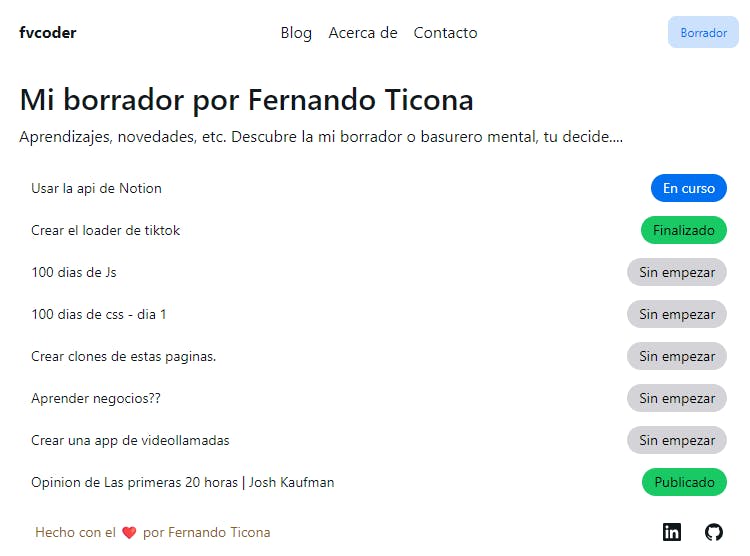
Solo tuve que iterar y mostrarlo de una manera que un ser humano pueda ver:
¿Usar paginas Hijos con la api de Notion?
Para usar las paginas hijos, solo tuve que usar el id de la pagina:
const notion = new Client({
  auth: process.env.NOTION_API_KEY,
});

// Metadata de la web y propiedades
const page: any = await notion.pages.retrieve({
  page_id: props.params.pageId,
});

// Contenido de la pagina
const block = await notion.blocks.children.list({
  block_id: page.id,
});

// Iteracion de contenido con excepsiones por si un bloque tiene mas hijos
const body = await Promise.all(
  block.results.map(async (x: any) => {
    if (x.type === 'table' && x.has_children) {
      const tableBlock = await notion.blocks.children.list({
        block_id: x.id,
      })
      return {
        ...x,
        tableChildren: tableBlock.results,
      };
    }

    return x;
  }),
);
De JSON a pagina web…
Lo hice de manera nativa por para ponerme el reto, pero si tienes otra alternativa tambien cuenta.
/* eslint-disable @typescript-eslint/no-explicit-any */
'use client';

import { Icon } from '@iconify-icon/react';
import {
  Button,
  Chip,
  Code,
  Divider,
  Image,
  Table,
  TableBody,
  TableCell,
  TableColumn,
  TableHeader,
  TableRow,
  Tooltip,
} from '@nextui-org/react';
import hlc from 'highlight.js';
import Link from 'next/link';
import { Fragment } from 'react';

import { cn } from '@/features/core/lib/tailwind';

export interface RenderData {
  // eslint-disable-next-line @typescript-eslint/no-explicit-any
  data: any;
}

function RenderRichText({ richText }: any) {
  if (richText.annotations.bold) {
    return <strong>{richText.plain_text}</strong>;
  }
  if (richText.annotations.italic) {
    return <i>{richText.plain_text}</i>;
  }
  if (richText.annotations.underline) {
    return <u>{richText.plain_text}</u>;
  }

  if (richText.annotations.strikethrough) {
    return <s>{richText.plain_text}</s>;
  }
  if (richText.annotations.code) {
    return <Code size="sm">{richText.plain_text}</Code>;
  }
  if (richText.text.link && richText.text.link.url) {
    return (
      <a
        href={richText.text.link.url}
        className="text-blue-400 hover:underline"
        target="_blank"
        rel="noreferrer"
      >
        {richText.plain_text}
      </a>
    );
  }

  return <Fragment>{richText.plain_text}</Fragment>;
}

export function Render(props: RenderData) {
  if (
    !props.data ||
    Object.keys(props.data as Record<string, any>).length === 0 ||
    Array.isArray(props.data)
  ) {
    return null;
  }

  if (props.data.type === 'title') {
    return (
      <>
        {props.data.title.map((x: any) => (
          <span key={x.plain_text}>{x.plain_text}</span>
        ))}
      </>
    );
  }

  if (props.data.type === 'status') {
    return (
      <Chip
        color={
          props.data.status.color === 'green'
            ? 'success'
            : props.data.status.color === 'blue'
              ? 'primary'
              : 'default'
        }
      >
        {props.data.status.name}
      </Chip>
    );
  }

  if (props.data.type === 'created_time') {
    return (
      <>
        {new Date(props.data.created_time as string).toLocaleString('es-BO', {
          year: 'numeric',
          month: 'long',
          day: 'numeric',
        })}
      </>
    );
  }

  if (props.data.type === 'multi_select') {
    return (
      <div className="flex flex-wrap gap-1">
        {props.data.multi_select.map((x: any) => (
          <div
            key={x.id}
            className={cn(
              'border rounded-md px-2 select-none pointer-events-none',
              {
                'bg-orange-500': x.color === 'orange',
                'bg-blue-500 text-white': x.color === 'blue',
                'bg-purple-500 text-white': x.color === 'purple',
                'bg-gray-700 text-white': x.color === 'default',
                'bg-gray-500 text-white': x.color === 'gray',
                'bg-pink-500 text-white': x.color === 'pink',
                'bg-stone-600 text-white': x.color === 'brown',
                'bg-green-500 text-white': x.color === 'green',
                'bg-yellow-500 text-white': x.color === 'yellow',
              },
            )}
          >
            <small>{x.name}</small>
          </div>
        ))}
      </div>
    );
  }

  if (props.data.type === 'url') {
    return (
      <a className="text-blue-500 hover:underline" href={props.data.url}>
        {props.data.url}
      </a>
    );
  }

  if (props.data.type === 'relation') {
    return (
      <div>
        {props.data.relation.map((x: any) => (
          <Button
            as={Link}
            href={`/draft/${x.id}`}
            key={x.id}
            size="sm"
            startContent={<Icon icon="fluent:open-16-regular" />}
            color="default"
          >
            <span>Abrir</span>
          </Button>
        ))}
      </div>
    );
  }

  if (props.data.type === 'paragraph') {
    return (
      <p>
        {props.data.paragraph.rich_text.map((x: any) => (
          <RenderRichText key={`${x.plain_text}`} richText={x} />
        ))}
      </p>
    );
  }

  if (props.data.type === 'image') {
    if (props.data.image.type === 'external') {
      return (
        <Tooltip
          content={
            props.data.image.caption.length
              ? props.data.image.caption[0].plain_text
              : undefined
          }
        >
          <Image
            src={props.data.image.external.url}
            className="w-full h-auto"
            alt={
              props.data.image.caption.length
                ? props.data.image.caption[0].plain_text
                : ''
            }
          />
        </Tooltip>
      );
    }

    if (props.data.image.type === 'file') {
      return (
        <Tooltip
          content={
            props.data.image.caption.length
              ? props.data.image.caption[0].plain_text
              : undefined
          }
        >
          <Image
            src={props.data.image.file.url}
            className="w-full h-auto"
            alt={
              props.data.image.caption.length
                ? props.data.image.caption[0].plain_text
                : ''
            }
          />
        </Tooltip>
      );
    }
  }

  if (props.data.type === 'divider') {
    return <Divider />;
  }

  if (props.data.type === 'quote') {
    return (
      <blockquote>
        <p>
          {props.data.quote.rich_text.map((x: any) => (
            <RenderRichText key={`${x.plain_text}`} richText={x} />
          ))}
        </p>
      </blockquote>
    );
  }

  if (props.data.type === 'heading_1') {
    return (
      <h1>
        {props.data.heading_1.rich_text.map((x: any) => (
          <RenderRichText key={`${x.plain_text}`} richText={x} />
        ))}
      </h1>
    );
  }
  if (props.data.type === 'heading_2') {
    return (
      <h1>
        {props.data.heading_2.rich_text.map((x: any) => (
          <RenderRichText key={`${x.plain_text}`} richText={x} />
        ))}
      </h1>
    );
  }
  if (props.data.type === 'heading_3') {
    return (
      <h1>
        {props.data.heading_3.rich_text.map((x: any) => (
          <RenderRichText key={`${x.plain_text}`} richText={x} />
        ))}
      </h1>
    );
  }

  if (props.data.type === 'bulleted_list_item') {
    return (
      <ul>
        <li>
          {props.data.bulleted_list_item.rich_text.map((x: any) => (
            <RenderRichText key={`${x.plain_text}`} richText={x} />
          ))}
        </li>
      </ul>
    );
  }

  if (props.data.type === 'callout') {
    return (
      <div className="p-4 bg-green-100 dark:bg-green-900 rounded-md flex items-start gap-2">
        <div>
          {props.data.callout.icon.type === 'emoji' ? (
            props.data.callout.icon.emoji
          ) : (
            <Image
              src={props.data.callout.icon.file.url}
              width={16}
              height={16}
            />
          )}
        </div>
        <div className="flex-1">
          {props.data.callout.rich_text.map((x: any) => (
            <RenderRichText key={`${x.plain_text}`} richText={x} />
          ))}
        </div>
      </div>
    );
  }

  if (props.data.type === 'table') {
    // console.log(props.data);
    const columns = Array.from({ length: props.data.table.table_width }).map(
      (_, i) => ({ key: String(i) }),
    );

    const rows = props.data.tableChildren.map((y: any) => {
      const newData: Record<string, any> = {
        id: y.id,
      };

      y.table_row.cells.forEach((x: any, index: number) => {
        newData.key = String(index);
        newData[`cell_${index}`] = x[0] ?? {};
      });

      return newData;
    });

    return (
      <div className="not-prose">
        <Table aria-label="Table" shadow="sm">
          <TableHeader columns={columns}>
            {(column) => (
              <TableColumn key={column.key}>
                {props.data.tableChildren[0]
                  ? props.data.tableChildren[0].table_row.cells[
                      Number(column.key)
                    ][0].plain_text
                  : ''}
              </TableColumn>
            )}
          </TableHeader>
          <TableBody items={rows ?? []}>
            {(item: any) => {
              return (
                <TableRow key={item.id}>
                  {(columnKey) => {
                    return (
                      <TableCell>
                        {item[`cell_${columnKey}`] ? (
                          <Render data={item[`cell_${columnKey}`]} />
                        ) : (
                          ''
                        )}
                      </TableCell>
                    );
                  }}
                </TableRow>
              );
            }}
          </TableBody>
        </Table>
      </div>
    );
  }

  if (props.data.type === 'text') {
    return (
      <p>
        <RenderRichText richText={props.data} />
      </p>
    );
  }

  if (props.data.type === 'code') {
    const plainHtml = props.data.code.rich_text.map((code: any) => {
      // eslint-disable-next-line @typescript-eslint/no-unnecessary-condition
      const result = hlc.highlight((code.plain_text as string) ?? '', {
        language:
          props.data.code.language !== 'plain text'
            ? props.data.code.language
            : 'text',
      });

      return result.value;
    });

    return (
      <Fragment>
        {plainHtml.map((html: any, i: number) => (
          <pre key={`code-section-${i}`}>
            <code
              className={`hljs language-${props.data.code.language} rounded-xl`}
              dangerouslySetInnerHTML={{ __html: html }}
            />
          </pre>
        ))}
      </Fragment>
    );
  }

  return null;
}
Espero que hayas aprendido algo nuevo, gracias
Fernando Ticona (@fvcoder)
PD: Estoy considerando en migrar de Prismic a Notion para mi blog
PD2: Puedes encontrar el borrador original aqui.